Quicken to QuickBooks Online
Move years of Quicken into QuickBooks. Balanced to the cent.
Upload a QIF export, see exactly what each line will become, and send it only once every account adds up. If you change your mind, one click takes it back out.
Try it free on the last eight months of your file.
- Nothing is written until you approve it
- Every account checked before sending
- Undo with one click
How it works
Four steps, and you see every one of them
No black box. Each step shows you what it found and what it is about to do, in words rather than codes.
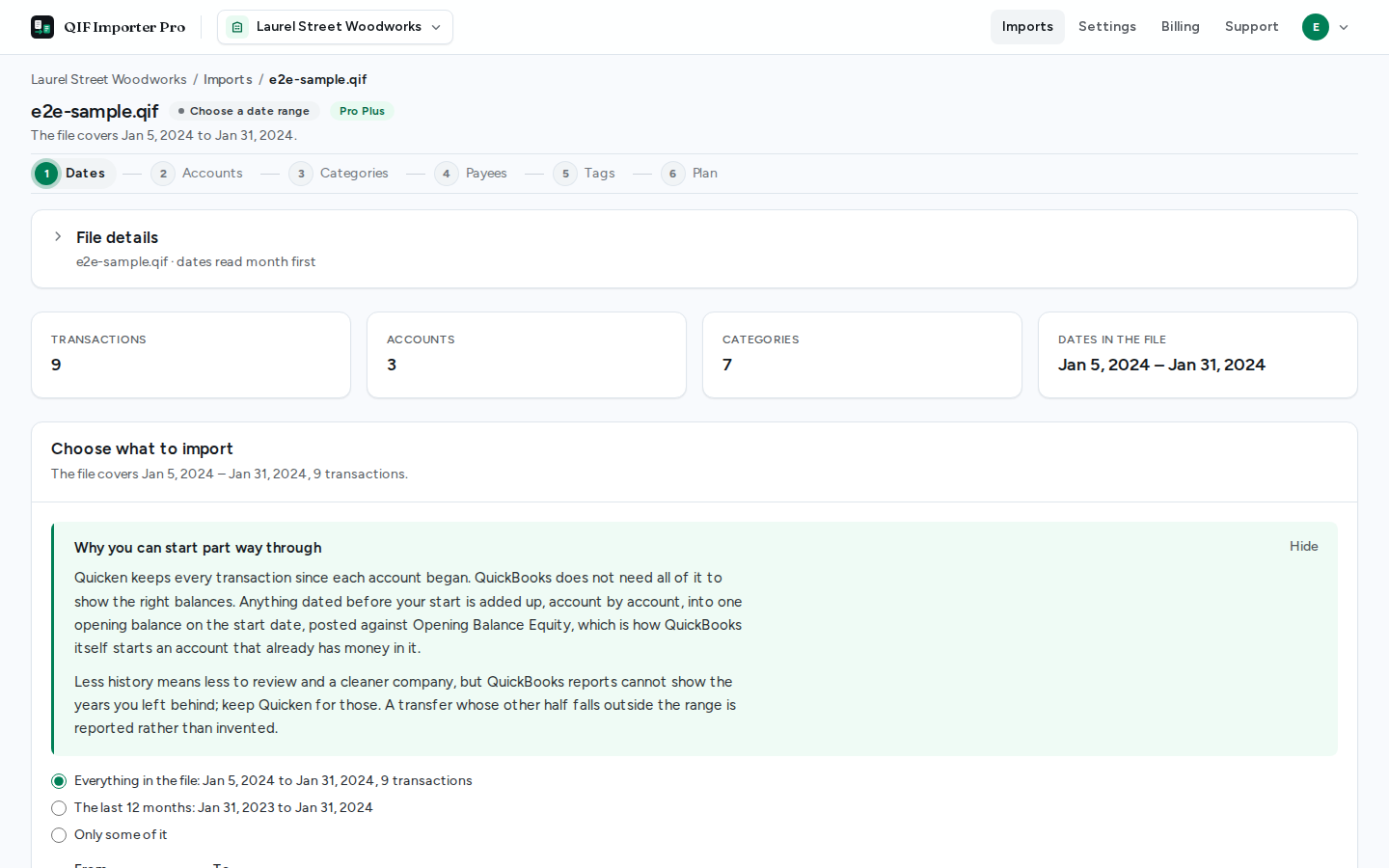 1
1Choose what to bring across
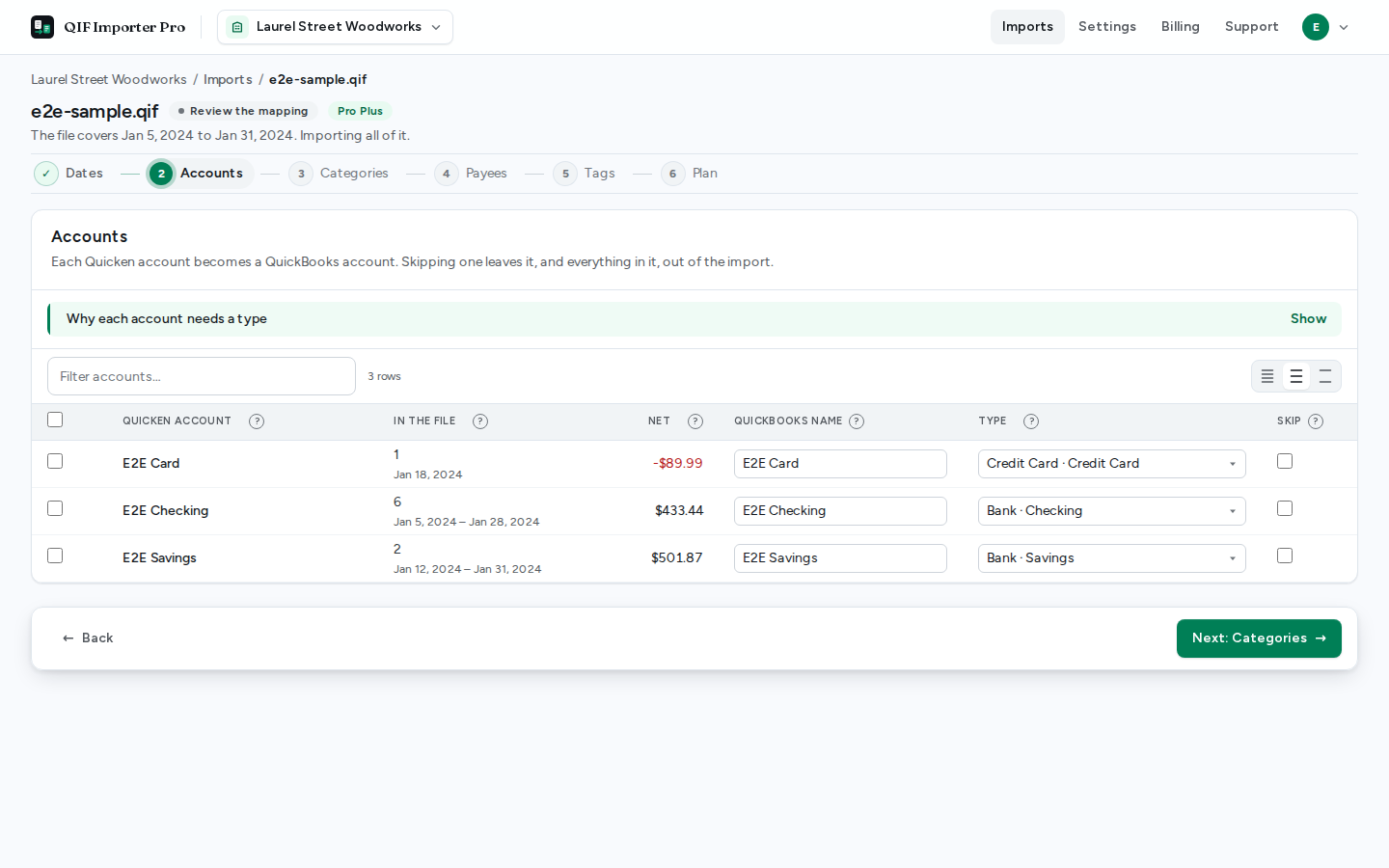
Upload a QIF export and pick the dates. Everything before your start becomes one opening balance per account.
- 2
Review the mapping
Each Quicken account and category is matched to a QuickBooks one, with the reason for every choice in plain words.
 3
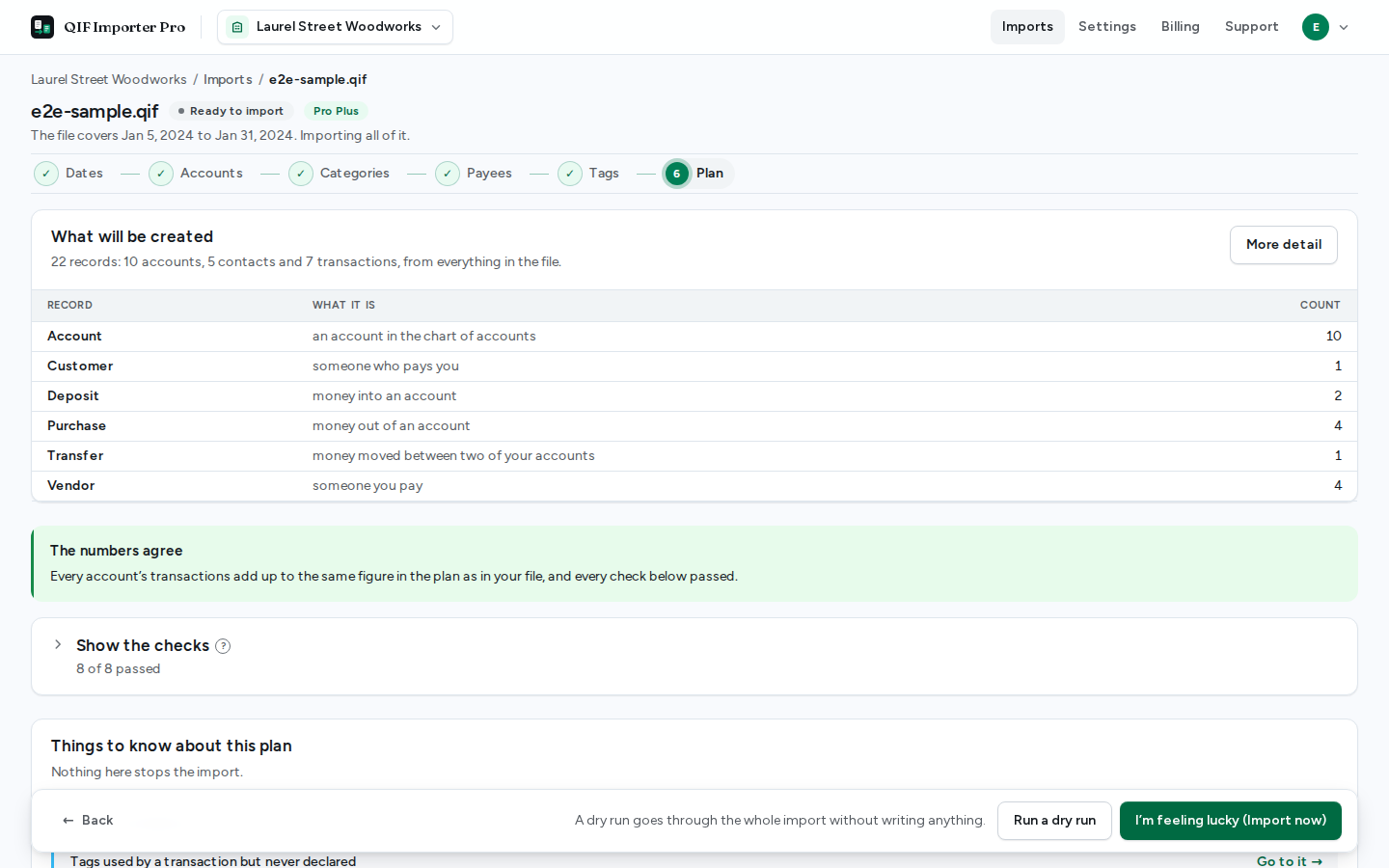
3Check the numbers
The plan is proved against your file, account by account. If anything is out by a cent, nothing is sent.
 4
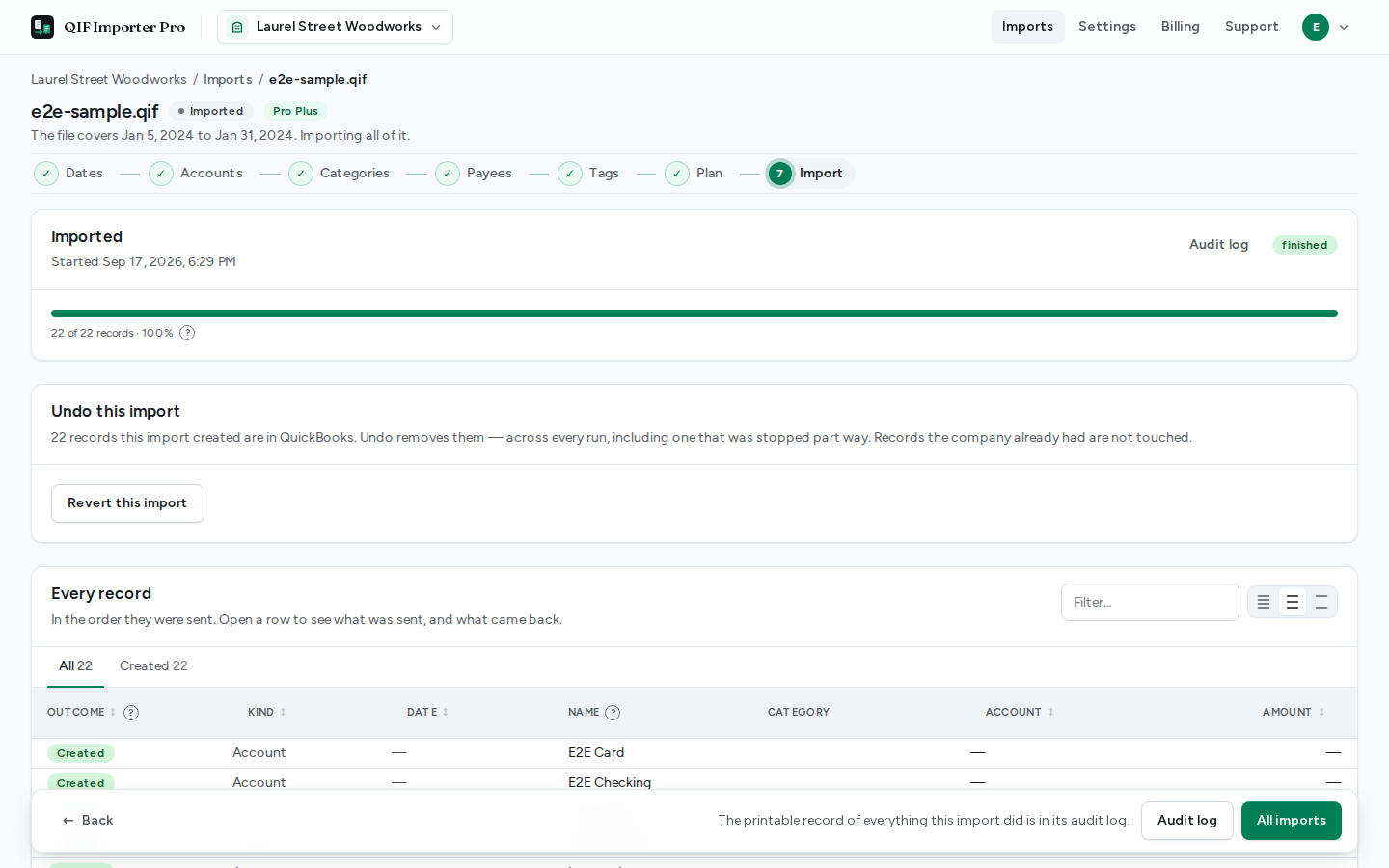
4Import, and undo if you need to
Records go in the order QuickBooks needs them. One click takes them back out again.
The careful parts
Where Quicken imports usually go wrong
Quicken and QuickBooks keep books differently. These are the places the difference shows, and what happens to each.
A transfer stays one transfer
Move $500 from checking to savings and Quicken records it twice, once in each account. Sending both would count the $500 twice, so the pair is recognised and sent as the one transfer it always was.
Safe to run twice
Every record carries a key made from the line it came from. An import that stops half way picks up where it left off, and running the same file again finds what is already there instead of creating it twice.
Start where you like
Bring across last year, or the last ten. History before your start date is added up into an opening balance for each account, so the balances in QuickBooks are right either way.
Nothing entered twice
If the company already holds some of the period, entered by hand or from a bank feed, each likely match is shown beside yours and you decide: import it anyway, leave it out, or treat it as the same one.
Straight answers
What stays behind, and why
Some of a Quicken file has no honest equivalent in QuickBooks Online. Rather than guess, the import counts it, names it, and leaves it out, and you hear about it on the first screen, not in your books.
Investment accounts stay in Quicken
QuickBooks Online has no investment register, so buys, sells, dividends and share movements have nothing faithful to become. They are counted and left out. Money moved between a brokerage and your bank accounts still comes across.
Home & Business invoices are not converted
QuickBooks has its own invoicing and receivables. Invoice sections are reported by name, with a count, and skipped; customers and open invoices are set up in QuickBooks.
One currency per file
QIF carries no currency, so every amount is imported in the company's home currency. A file that mixes currencies is split before upload rather than guessed at.
Templates and reference data are left behind
Memorized transactions, budgets, security prices and payee lists are not history, so they are not imported.
The promise
If the numbers do not agree, nothing is sent.
Before a single record reaches QuickBooks, the plan is checked against your Quicken file, the way an accountant would check it afterwards. Every check has to pass.
- Every transaction has somewhere to go
- Each transaction's lines add up to its total
- Journal entries balance
- Transfers move money between two different accounts
- Everything a transaction refers to is in the plan
- No two new records share a name
- Split transactions add up
- Every line in the file could be read
Pricing
Pay once, for one company
The last eight months of a file import free, so you can see what would happen to your books before paying.
Free
Try it on the last 8 months of a register.
$0always
- The last 8 monthsTransactions dated within the window are imported. Older history is rolled into an opening balance so the books still balance.
- Duplicate-safeRe-running an interrupted import finishes it rather than doubling it.
- Structural checksAn import that does not balance against the register is refused, not sent.
Pro import
A month of Pro imports into one company, the whole history. For one user.
$249one time, per company
- The whole register, or any rangeImport everything, or only part of it. Transfers whose other leg falls outside the range are accounted for, and a synthesized opening balance carries the history you left behind.
- Merge reviewCompare against what QuickBooks already holds and resolve each match yourself: create, skip, or link.
- Reconciliation reportThe per-account money table, not just a pass or fail.
- Post-import verificationRead every created transaction back out of QuickBooks and recompute each account's net.
- Revert, and a money-back guaranteeUndo an import from QuickBooks with one click. Revert what you imported within 30 days and the refund is automatic — no email, no ticket.
Pro Plus
Keeps a company's imports Pro after the month runs out, for one user. Requires a Pro import for that company.
$9.99per month, per company
- Pro imports into one company, for goodCarries on where a Pro import's month ends: every import into the company is a Pro import for as long as the subscription runs.
- Audit logs kept for good, encryptedThe printable record of every import stays available indefinitely, encrypted at rest. Otherwise it is purged with the upload.
Money-back guarantee. Undo what a Pro import brought into QuickBooks within 30 days and the $249 is refunded automatically. What a revert removes, and what it leaves, is set out in the refund policy.
Questions
What people ask before they start
Anything else, write to us from the support page after signing in.
Is my data safe?
You sign in with Intuit, so we never see a password. The connection to your company is stored encrypted, the file you upload is deleted automatically after 30 days, and every action taken on your books is written to an audit log you can print. The security page has the detail.
What happens to my investment accounts?
They stay in Quicken. QuickBooks Online has nowhere faithful to put buys, sells and share movements, so they are counted and left out, and the import tells you how many. Money moved between an investment account and a bank account still comes across.
Can I undo an import?
Yes. One button removes every transaction the import created. Do it within 30 days of buying a Pro import and the $249 is refunded automatically, with nobody to contact.
Do I need QuickBooks Online Plus?
No. Plus is only needed if you want Quicken tags to become QuickBooks classes or locations. On any plan, tags can be kept in each transaction's description instead, which is the default.
I look after several companies. How does that work?
Connect each one. The company you are working in is shown at the top of every page, imports are kept separate per company, and a Pro import or Pro Plus is bought for one company at a time.
What does “the numbers agree” actually mean?
Before anything is sent, the plan is checked against your file: every transaction has somewhere to go, transfers pair up, split lines add up, and each account moves by exactly the same amount in the plan as in Quicken. If any check fails, the import will not start.
See what your books would look like, before anything changes.
Sign in with your Intuit account, connect a company, and upload a file. Reviewing the plan is free.
Sign in with Intuit